- What is Soulanma?
- Getting started with flowcharts
- Getting started with mind maps
- Getting started with wireframes
- What can you do with Soulanma?
- Using Soulanma Boards
- Working with Soulanma's infinite canvas
- 5 ways to create a new file
- Getting started with Soulanma AI
- How to create a new workspace
- How to use AI-assisted mind mapping
- Customizing file and folder icons
- Mentions in Soulanma files
- Customizing diagram shapes
- Getting started with sequence diagrams
- Using the command menu
- Commenting in Soulanma files
- Getting started with flowcharts
- Getting started with mind maps
- Getting started with wireframes
- Using Soulanma Boards
- Mentions in Soulanma files
- Customizing diagram shapes
- Using sections on the Soulanma canvas
- Sketch on the canvas with freehand drawing
- Annotating files for more detail
- Text-to-object pasting options
- Adding and displaying links in Soulanma files
- Linking to sections and objects
- How to draw a line
- How to filter selected objects
- Presenting in Soulanma
- Voting on sticky notes
- Using the timer in boards
- Working with the grid and auto-alignment
- Working with connectors
- Does Soulanma have cloud architecture icons?
- Using tables in Soulanma
- Using sticky notes in boards
- Optimizing performance in larger boards
- Using spellcheck
- Setting custom thumbnails
- How overlays work in Wireframe mode
- Why are the colors of some board items toned down?
- How to add emojis
- Hiding cursors while collaborating
- Measure between objects in Boards
- Uploading files to Soulanma
- Getting started with sequence diagrams
- Working with Mermaid code in Soulanma
- Keeping boards tidy with alignment, distribution, and auto-layout
- Customizing file and folder icons
- How to draw a line
- How to filter selected objects
- Markdown support in Soulanma
- Does Soulanma have cloud architecture icons?
- Embedding external content into Soulanma
- How overlays work in Wireframe mode
- Moving and copying files
- Using Soulanma on mobile
- Does Soulanma have a dark mode?
- File version history
- Why are the colors of some board items toned down?
- Does Soulanma support offline mode?
- Teams, workspaces & sections explained
- Does Soulanma work on iPad?
- Free viewers commenting in workspaces
- Soulanma desktop app
- Is Soulanma available in other languages?
- Inverting the zoom direction in Soulanma so it works more like Sketch
- Troubleshooting issues and reporting bugs
- How to add emojis
- Team FAQs
- How to restore deleted files from the trash
- Searching in your Soulanma workspace
- Organizing files in your workspace
- I’ve upgraded but still don’t have access to the paid features
- Why can't I edit my files?
- Reporting content in Soulanma
- Does Soulanma have an affiliate or referral program?
- Collaborating with others in real time
- Sharing files and managing access permissions
- Hiding cursors while collaborating
- How to switch between workspaces
- Sharing feedback and feature requests
- Notification inbox
- How to change or reset your password
- Inverting the zoom direction in Soulanma so it works more like Sketch
- Customizing your notifications in Soulanma
- How to verify your Soulanma account
- How to delete your account
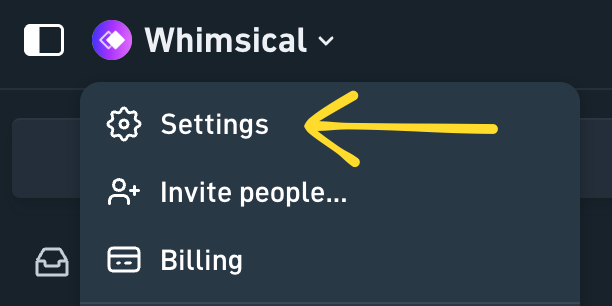
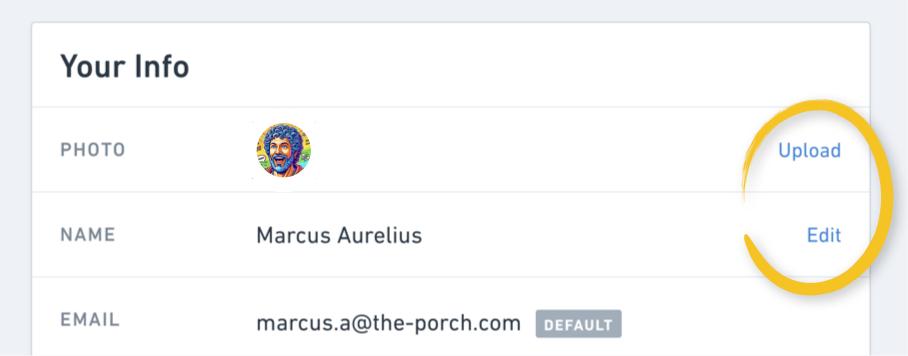
- Adding your name and avatar to your account
- Changing your account email address, or adding a new one
- How to create a new workspace
- Teams, workspaces & sections explained
- Free viewers commenting in workspaces
- Requesting file access
- Workspace discovery settings
- Sorting files and folders
- Changing workspace members’ roles
- Adding and removing members
- Team FAQs
- Creating and managing teams
- Requesting workspace editor access
- Linking between files
- Member roles in Soulanma
- How to delete a workspace
- How to upgrade your workspace
- Guest access
- Changing your workspace name, logo, or URL
- Collaborating with others in real time
- Offboarding users
- Sharing files and managing access permissions
- How to switch between workspaces
- Consolidating workspaces
- Uploading files to Soulanma
- Organizing your work with tabbed folders
- SAML
- Setting up SAML session expiry
- Security
- Prevent new workspace creation
- Soulanma app for ChatGPT
- Embedding & integrating boards with Jira Issues
- Integrating Soulanma with Google Docs
- Embedding files in ClickUp views
- Embedding files in Asana
- Embedding Soulanma files
- Creating Jira & Confluence Smart Links for Soulanma Files
- Embedding files in Guru
- Embedding files in Trello
- Embedding & integrating boards in Notion
- Integrating Soulanma and GitHub
- Embedding files in Zendesk
- Support Soulanma embeds in your app with EmbedKit
- Soulanma previews and notifications in Slack
- Embedding files in Canva
- Integrating Soulanma and Linear
- Embedding files in Nuclino
- Embedding files in Monday
- Embedding files in Medium
- Embedding files in Slab
- Embedding files in Coda
- Soulanma API (Beta)
- MCP
- Soulanma MCP - Supported tools
- Soulanma Desktop MCP
- Soulanma Remote MCP
- Reporting content in Soulanma
- SAML
- SAML SSO in Soulanma
- SAML SSO with Okta
- SAML SSO with Auth0
- SAML SSO with OneLogin
- SAML SSO with Microsoft Entra ID (Azure AD)
- SAML SSO with Google Workspace (previously G-Suite)
- SAML SSO with Active Directory Federation Services (ADFS)
- SAML SSO with other identity providers
- Setting up SAML session expiry
- Managing email changes with SAML and SCIM
- SCIM
- Setting up SCIM with Okta
- Setting up SCIM with JumpCloud
- Setting up SCIM with Entra ID (Azure AD)
- SCIM provisioning with Groups in Okta
- SCIM user provisioning in Soulanma
- SCIM provisioning with Groups in Entra ID (Azure AD)
- Security
- Setting up Two-factor Authentication (2FA)
- Prevent new workspace creation
- Whitelisting Soulanma domains
- Signing in with your Soulanma account on multiple devices
- Contact us