

Releases
Our latest features and improvements to help you work with more focus and less friction.
- 2024.2
Our Grammarly integration is here!
Grammarly’s browser extensions are now compatible with Soulanma to help you identify typos, write clearly, and convey the right tone, whatever you’re writing. For those using the Grammarly desktop app with Soulanma, we fixed the bug that put accepted suggestions in the wrong place.
- 2024.1
Our built-in emoji keyboard is here
Brighten any doc or board by typing : to search and add emojis.
- 2023.48
Rotate images in boards
You can now rotate images on Soulanma boards. If an image gets accidentally uploaded upside down, give this feature a spin.
- 2023.47
Soulanma Diagrams GPT
If you're a ChatGPT Plus user, you can now generate flowcharts, mind maps and sequence diagrams in ChatGPT with the Soulanma Diagrams GPT.
- 2023.46
Sequence diagram actors

Soulanma now has a native tool for creating sequence diagrams. To get started, click the diagram shapes menu, then select sequence diagram actor. Combine sequence diagram actors with connectors to build and scale any sequence diagram.
- 2023.45
Soulanma AI for sequence diagrams
Need to create a technical or process diagram? Consider it done. You can now create sequence diagrams instantly with Soulanma AI. To get started, select generate with AI from the toolbar, enter a text prompt, select sequence diagram, then create. Checkout this demo video for more info.
- 2023.44
Paste as options that format content for you

Decide how pasted content comes to life with new pasting options for docs and boards. Just copy content, then right-click and paste as a mind map, sticky note(s), card(s), table or bulleted list.
- 2023.43
Improved file search when adding links
We’ve made it easier to create and share links to files across your Soulanma workspace. The ‘Add link’ menu will now allow you to search files, as well as suggest files based on highlighted text. No more tab switching needed!
- 2023.42
Filter selection

You can now filter a selection of items down to just the ones you want. Select items on a board, click the filter menu, and choose a shape or color. Presto: the matching items are selected! Try it out the next time you need to move or style items in bulk.
- 2023.41
Paste mermaid text as a flowchart
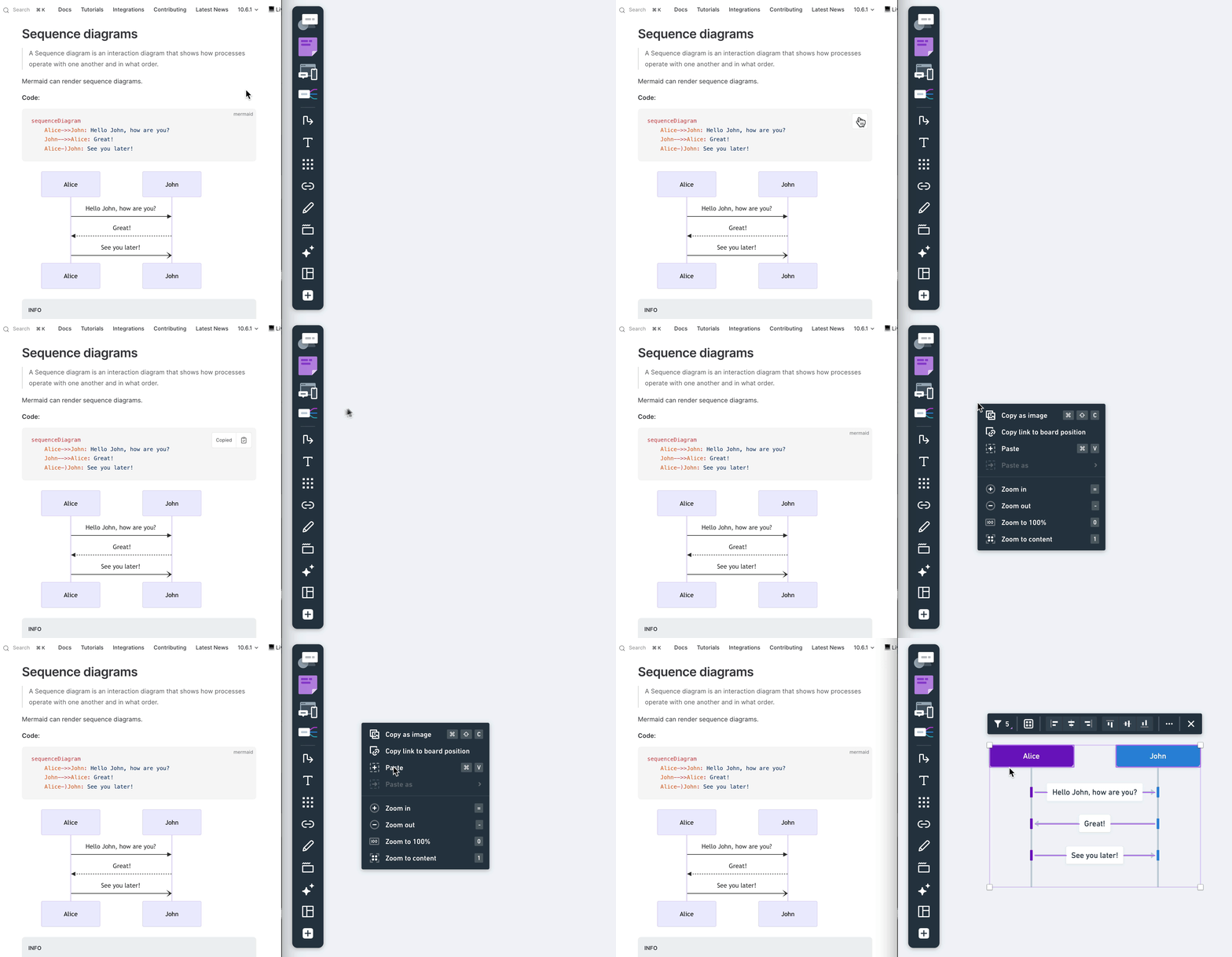
You can paste mermaid as Soulanma flowcharts and sequence diagrams.
Mermaid is a diagram format written in plain text. It is often stored alongside source code or other technical documentation.Once pasted, you can immediately start editing and customizing your flowchart. Add new steps, change texts, or adjust the design to make it fit your needs. This feature makes it simple to bring in diagrams from other tools or documents and continue working on them in Soulanma.
Get started by pasting this example flowchart into a board:
graph TD
A[User requests password reset]
B{Is the user registered?}
A --> B
B -- Yes --> C[Send password reset link to user's email]
C --> D[User receives password reset link]
B -- No --> E[Inform user that they are not registered]